![GitHub Alerts & Callouts: code card showing the > [!NOTE] and > [!WARNING] syntax, rendered as a blue Note and an amber Warning box](https://markdown.land/wp-content/uploads/2026/10/featured-markdown-alerts.webp)
To add a note, tip, or warning box in GitHub Markdown, start a blockquote with an alert marker on a line of its own, and put your text on the next lines of the same quote. GitHub has exactly five types:
> [!NOTE]
> Background information people should see, even when skimming.

> [!TIP]
> An optional shortcut or a better way to do something.

> [!IMPORTANT]
> Something people must know or do to succeed.

> [!WARNING]
> Something that needs attention right now to avoid problems.

> [!CAUTION]
> A risky action, like one that deletes data or can't be undone.
Here’s what that looks like on GitHub:
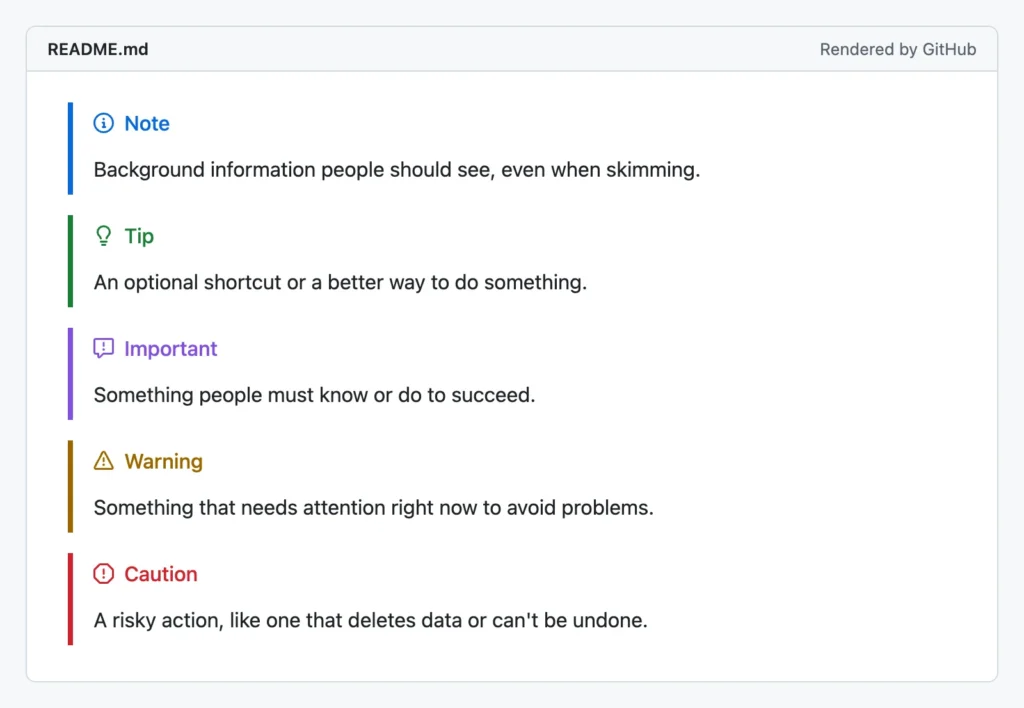
Alerts (people also call them callouts or admonitions) work in READMEs and other Markdown files on GitHub, and in issues, pull requests, discussions, wikis, and gists. GitLab and Obsidian understand the same syntax. Most other Markdown tools show a plain blockquote with a literal [!NOTE] in it.

The rest of this article covers the rules GitHub doesn’t document (I ran a batch of edge cases through GitHub’s own renderer), Obsidian callouts, the admonition syntax of MkDocs, Docusaurus, Quarto, and Pandoc, and a fallback that looks fine everywhere.
The five GitHub alert types
The type decides the color, the icon, and the title. You can’t add your own types, and the title is always the English type name.
| Marker | Title and color on GitHub | Use it for |
|---|---|---|
> [!NOTE] | Note, blue, info icon | Context people shouldn’t miss, even when skimming: “This also works on Windows.” |
> [!TIP] | Tip, green, light bulb | Optional advice: a shortcut, a faster command, a nicer way. |
> [!IMPORTANT] | Important, purple, speech bubble with an exclamation mark | Something required to succeed: “You need Node 20 or newer.” |
> [!WARNING] | Warning, yellow, triangle | Something that will cause problems if ignored: breaking changes, deprecations. |
> [!CAUTION] | Caution, red, stop sign | Risky or irreversible actions: deleting data, force-pushing, production settings. |
There’s more on picking the right one in when to use which alert, further down.
Alert syntax rules (tested on GitHub)
GitHub Docs gives the five examples and a single rule: alerts can’t be nested within other elements. That leaves a lot of questions open, so I ran every variation I could think of through GitHub’s Markdown API in October 2026. That’s GitHub’s own renderer, the one it uses for issues and comments. Here’s what happened:
| What I tried | Source (first line) | Result on GitHub |
|---|---|---|
| Uppercase marker, text on the next line | > [!NOTE] | ✅ Alert |
| Lowercase or mixed case | > [!note], > [!Note] | ✅ Alert |
No space after > | >[!NOTE] | ✅ Alert |
Empty > line after the marker | > [!NOTE] then > | ✅ Alert |
| Bold, links, lists, code blocks inside | > - item, > ```bash | ✅ Alert, all rendered |
| Custom title after the marker | > [!NOTE] My title | ❌ Plain blockquote, marker shown as text |
| Text on the same line as the marker | > [!NOTE] Read this | ❌ Plain blockquote |
| Marker with nothing after it | > [!NOTE] (only line) | ❌ Plain blockquote |
| Space inside the brackets | > [! NOTE] | ❌ Plain blockquote |
| Any other type | > [!DANGER], > [!INFO] | ❌ Plain blockquote |
| Two markers in one quote | > [!NOTE] … > [!WARNING] | ⚠️ First becomes an alert, second stays literal text inside it |
| Alert inside a list item | > [!NOTE] (indented) | ❌ Plain blockquote |
| Alert inside a regular blockquote | > > [!TIP] | ❌ Plain nested blockquote |
| Alert inside an alert | > > [!TIP] under a [!NOTE] | ⚠️ Outer alert works, inner one is a plain quote |
Alert inside <details> | <details> + blank line + > [!TIP] | ❌ Plain blockquote |
| The old beta syntax | > **Note** | ❌ Plain blockquote with bold text |
Boiled down to rules:
- The marker goes on its own line, and the content starts on the next line. Anything after the closing bracket, whether you meant it as a title or as text, turns the whole thing back into a normal quote. GitHub has no custom titles.
- An alert needs content. A lone
> [!NOTE]stays a blockquote with the marker as text. - Case doesn’t matter, spelling does.
[!note]works,[! NOTE]and[!NOTES]don’t. Only the five types exist. - One alert per blockquote. Separate alerts with a blank line (without a
>). If you keep the>on the empty line, it’s still one quote, and the second marker shows up as text. - Alerts only work at the top level of the document. Not in list items, not inside another quote or alert, not inside HTML like
<details>. If you need a note inside a numbered step, put the alert after the list, or use plain bold text inside the step. - Everything else is normal Markdown. Inside the alert you can use any blockquote content: several paragraphs (separated by a
>line), lists, links, images, and code blocks.
Here’s an alert that uses some of that:
> [!WARNING]
> Version 3 renames the config file. Before you upgrade:
>
> 1. Back up `config.yml`
> 2. Run the migration script:
>
> ```bash
> npx my-tool migrate
> ```
>
> See the [changelog](CHANGELOG.md) for details.
Warning
Version 3 renames the config file. Before you upgrade:
- Back up
config.yml - Run the migration script:
npx my-tool migrateSee the changelog for details.
One more thing about line breaks. In issues and comments, every line break you type shows up as a line break. In Markdown files, lines in the same paragraph are joined, like everywhere else in Markdown. That’s normal GitHub behavior, not something special to alerts. My Markdown line breaks article explains the details.
The HTML GitHub generates
If you want to style your own site to match GitHub, or you’re curious why an alert isn’t a quote anymore: GitHub replaces the blockquote with a <div>. This is the output for a note (I shortened the SVG icon):
<div class="markdown-alert markdown-alert-note">
  <p class="markdown-alert-title">
    <svg class="octicon octicon-info mr-2" …>…</svg>Note
  </p>
  <p>Useful information.</p>
</div>
The other types use the classes markdown-alert-tip, markdown-alert-important, markdown-alert-warning, and markdown-alert-caution, with the octicons light-bulb, report, alert, and stop. If you call the Markdown API yourself, use "mode": "gfm". In my tests, the plain markdown mode left every alert as an ordinary blockquote.
Where GitHub alerts work
On github.com, alerts render in:
- README files and every other .md file in a repository. See my README.md guide for the other GitHub-only extras.
- Issues, pull requests, discussions, and their comments. Use the Preview tab to check before you post.
- Wikis. GitHub added wiki support in October 2023, according to its feature announcement.
- Gists. I checked a few public gists with alerts in their Markdown files, and they rendered as alert boxes.
- GitHub Mobile, for Markdown files, according to the same announcement. I didn’t test the apps myself.
Places where your README also shows up, but alerts may not:
- GitHub Pages with Jekyll. Jekyll converts Markdown with kramdown, which doesn’t know the alert syntax, so by default you get a blockquote with
[!NOTE]in it. You’d need a plugin or a build step to change that. - PyPI. The library PyPI uses to render project descriptions, readme_renderer, turns alerts into labeled boxes since version 46.0 (August 2026), and PyPI’s requirements pin that version. I tested the library, not pypi.org itself, so I can’t tell you exactly what the boxes look like there.
- npm and other package registries. I couldn’t verify these. Assume a plain blockquote unless you’ve checked your own package page.
- VS Code’s Markdown preview. Not by default. See VS Code below.
The syntax isn’t unique to GitHub, by the way. Microsoft’s documentation tool DocFX has the same > [!NOTE] alerts with the same five types, and it also lets you define your own.
Obsidian callouts
Obsidian calls them callouts, and they use the same > [!type] syntax, with more features. Everything in this section comes from the official Obsidian docs. I don’t run Obsidian for this site, so I haven’t tested it myself.
Custom titles and title-only callouts
In Obsidian, text after the marker becomes the title. You can even leave out the body:
> [!tip] Use the command palette
> Press Ctrl+P (Cmd+P on a Mac) and type "callout".

> [!warning] Backups run at midnight
Both of these show up as plain quotes on GitHub, because GitHub doesn’t allow anything after the marker. If a note needs to work in both places, stick to the GitHub form.
Foldable callouts
Add a - right after the closing bracket to make a callout that starts collapsed, or a + for one that starts expanded but can be folded:
> [!faq]- Can callouts be folded?
> Yes. This text stays hidden until you click the title.
It behaves like this (an HTML lookalike, click the title):
Can callouts be folded?
Yes. This text stays hidden until you click the title.
GitHub alerts can’t fold. On GitHub, the closest thing is a <details> collapsible section, which can’t be combined with an alert (see the test table above).
Obsidian callout types
Obsidian has 13 types, several with aliases. The type is case-insensitive, and an unknown type falls back to the note style.
| Type | Aliases |
|---|---|
note | |
abstract | summary, tldr |
info | |
todo | |
tip | hint, important |
success | check, done |
question | help, faq |
warning | caution, attention |
failure | fail, missing |
danger | error |
bug | |
example | |
quote | cite |
Notice the aliases: GitHub’s [!IMPORTANT] looks like a tip in Obsidian, and [!CAUTION] looks like a warning. So all five GitHub types work in Obsidian, just with fewer distinct colors. The other direction doesn’t work: [!info], [!danger], [!question], and the rest show up as plain quotes on GitHub.
Obsidian also allows nested callouts (> > [!todo] inside a callout), and you can define your own types and colors with a CSS snippet. Neither carries over to GitHub.
GitLab alerts
GitLab added alerts in GitLab 17.10, with the same five types, in “any text box that supports Markdown”. Its Markdown docs write the types in lowercase and add two things GitHub doesn’t have: a custom title after the marker, and alerts in GitLab’s multiline blockquotes (>>>):
> [!warning] Data deletion
> The following steps delete your data for good.

>>> [!note] Things to consider
You don't need a > on every line here.

1. First consideration
2. Second consideration
>>>
GitLab’s API needs a login for rendering, so I couldn’t test GitLab the way I tested GitHub. If your project lives on both, the GitHub form (marker alone on the first line) is the safe common ground.
Callouts and admonitions in other Markdown tools
Documentation tools had note boxes long before GitHub, each with its own syntax. None of them is part of CommonMark, so none of this is portable.
MkDocs and Material for MkDocs
MkDocs uses Python-Markdown’s admonition extension. Turn it on in mkdocs.yml (add pymdownx.details for collapsible blocks):
markdown_extensions:
  - admonition
  - pymdownx.details
  - pymdownx.superfences
Then write !!!, the type, an optional title in quotes, and the content indented by four spaces. ??? makes it collapsible, ???+ collapsible but open:
!!! note "Custom title"
    Indented **content**.

??? warning
    Hidden until clicked.
I ran the first block through Python-Markdown 3.11 with the admonition extension, and it produced a <div class="admonition note"> with the custom title. Material for MkDocs styles 12 types: note, abstract, info, tip, success, question, warning, failure, danger, bug, example, and quote.
Docusaurus
Docusaurus wraps the content in three colons. The types are note, tip, info, warning, and danger, and a custom title goes in square brackets:
:::tip[Did you know?]
Some **content** with Markdown.
:::

::::info Parent
:::danger Child
Use one more colon on the outer block to nest.
:::
::::
Quarto
Quarto has the same five types as GitHub (note, tip, important, warning, caution), written as fenced divs. A heading inside sets the title, and collapse="true" folds it:
::: {.callout-note}
A plain note.
:::

::: {.callout-caution collapse="true"}
## Click to read the fine print
Hidden until expanded.
:::
Pandoc
Pandoc understands GitHub’s syntax through its alerts extension, which is on by default when you read gfm or commonmark_x, but not with Pandoc’s own markdown format. I tested with pandoc 3.9: pandoc -f gfm -t html turned a note into <div class="note"> with a “Note” title, and -f markdown left it as a quote. Pandoc is also more lenient than GitHub: it rendered an alert inside a list item, which GitHub doesn’t.
VS Code
VS Code’s built-in Markdown preview doesn’t render alerts. VS Code 1.106 added alert support to Markdown that extensions show in VS Code’s own UI, such as comment threads, and in the feature request, the VS Code team said they don’t plan to turn it on by default in the file preview. If you want alerts in the preview, install an extension that adds them: search the Extensions view for “GitHub alerts” or “Markdown alert”.
Comparison table
| Tool | Syntax | Custom title | Collapsible |
|---|---|---|---|
| GitHub | > [!NOTE] | No | No |
| GitLab 17.10+ | > [!note] | Yes, after the marker | Not documented |
| Obsidian | > [!note] | Yes, after the marker | Yes, [!note]- or [!note]+ |
| MkDocs (Material) | !!! note | Yes, !!! note "Title" | Yes, ??? note |
| Docusaurus | :::note … ::: | Yes, :::note[Title] | Not documented |
| Quarto | ::: {.callout-note} | Yes, heading or title="…" | Yes, collapse="true" |
| Pandoc (gfm input) | > [!NOTE] | No | No |
| VS Code preview | Extension needed | Depends on extension | Depends on extension |
A fallback that works everywhere
If your Markdown ends up in places without alert support, an alert degrades to a quote that starts with [!NOTE]. That’s readable, but it looks like a mistake. When I need a note that looks fine in every renderer, I use a blockquote with an emoji and a bold label:
> ⚠️ **Warning:** Version 3 renames the config file.
> Back it up before you upgrade.
Result:
⚠️ Warning: Version 3 renames the config file. Back it up before you upgrade.
It’s a plain blockquote, so it works in every Markdown renderer, including chat apps and package registries. You lose the colors, but the emoji does most of the work.
Before alerts existed, people on GitHub used a one-cell table to get a box with a border. It still works anywhere Markdown tables do, but the header row is bold and the box is as wide as its content, so I’d only use it where tables render and quotes look bad:
| ℹ️ Note |
|---------|
| The API key is only shown once. Copy it somewhere safe. |
| ℹ️ Note |
|---|
| The API key is only shown once. Copy it somewhere safe. |
What doesn’t work on GitHub: an HTML <div style="background: …">. GitHub strips style attributes, so you get plain text. That’s the same reason you center things with align=”center” there instead of CSS.
If the file is mainly read on GitHub but sometimes elsewhere (a README that’s also shown on a package registry, say), I just use the real alert syntax. The worst case is a quote with a [!NOTE] label, and people get the message anyway.
When to use which alert (and when not to)
GitHub’s own advice is to use alerts only when they’re crucial, to limit them to one or two per article, and not to put them back to back. I agree. Alerts work because they interrupt the reader, and a README with six colored boxes interrupts all the time. My rules of thumb:
- Ask “what happens if they skip it?” Nothing bad: it’s a note or tip, or just a normal paragraph. They get stuck: important. They break something: warning. They lose data or money: caution.
- Keep alerts short. One to three sentences. If it needs a list and a code block, it’s probably a section with its own heading.
- Put the alert right before the step it’s about, not at the end of the section where people read it too late.
- Don’t use alerts for decoration. A project tagline or a “Star this repo!” message isn’t a note.
- Don’t rely on color alone. The title (“Warning”) carries the meaning for people who can’t see the color, so pick the type whose title fits the message.
FAQ
Why does [!NOTE] show up as plain text?
Either the renderer doesn’t support alerts (most tools outside GitHub, GitLab, and Obsidian don’t), or the syntax is slightly off. On GitHub, the usual culprits are text on the same line as the marker, a typo in the type, an alert with no text after the marker, or an alert inside a list item or another quote. The test table in the syntax rules section lists every case I found.
Can I change the color or title of a GitHub alert?
No. On GitHub, the type sets the color, icon, and title, and the title is always the English name of the type. Text after the marker breaks the alert, and style attributes are stripped. GitLab and Obsidian do allow a custom title after the marker, and Obsidian lets you define your own colors with CSS.
Can I nest alerts or put one in a list?
Not on GitHub. Alerts only render at the top level of a document. An alert inside another alert, a quote, a list item, or a <details> block shows up as a normal quote. Obsidian and Docusaurus do support nested callouts.
Do GitHub alerts work in GitLab and Obsidian?
Yes. GitLab supports the same five types since GitLab 17.10. Obsidian renders them as callouts, although [!IMPORTANT] looks like a tip there and [!CAUTION] like a warning. The reverse is not true: Obsidian’s extra types, titles, and folding don’t work on GitHub.
Are alerts part of standard Markdown?
No. They’re not in CommonMark or in the GFM spec. They’re a GitHub extension built on top of the normal blockquote, which is exactly why they fall back to a readable quote elsewhere. For the rest of the syntax that does work everywhere, see my Markdown cheat sheet, which also has a short alerts section.